PartPacker Image to 3D Mesh
Upload one image and PartPacker returns a 3D mesh you can preview and download as GLB. A short, nine-node graph with seed, steps and CFG controls.
- L40S
- 3D
- Free template
How it works
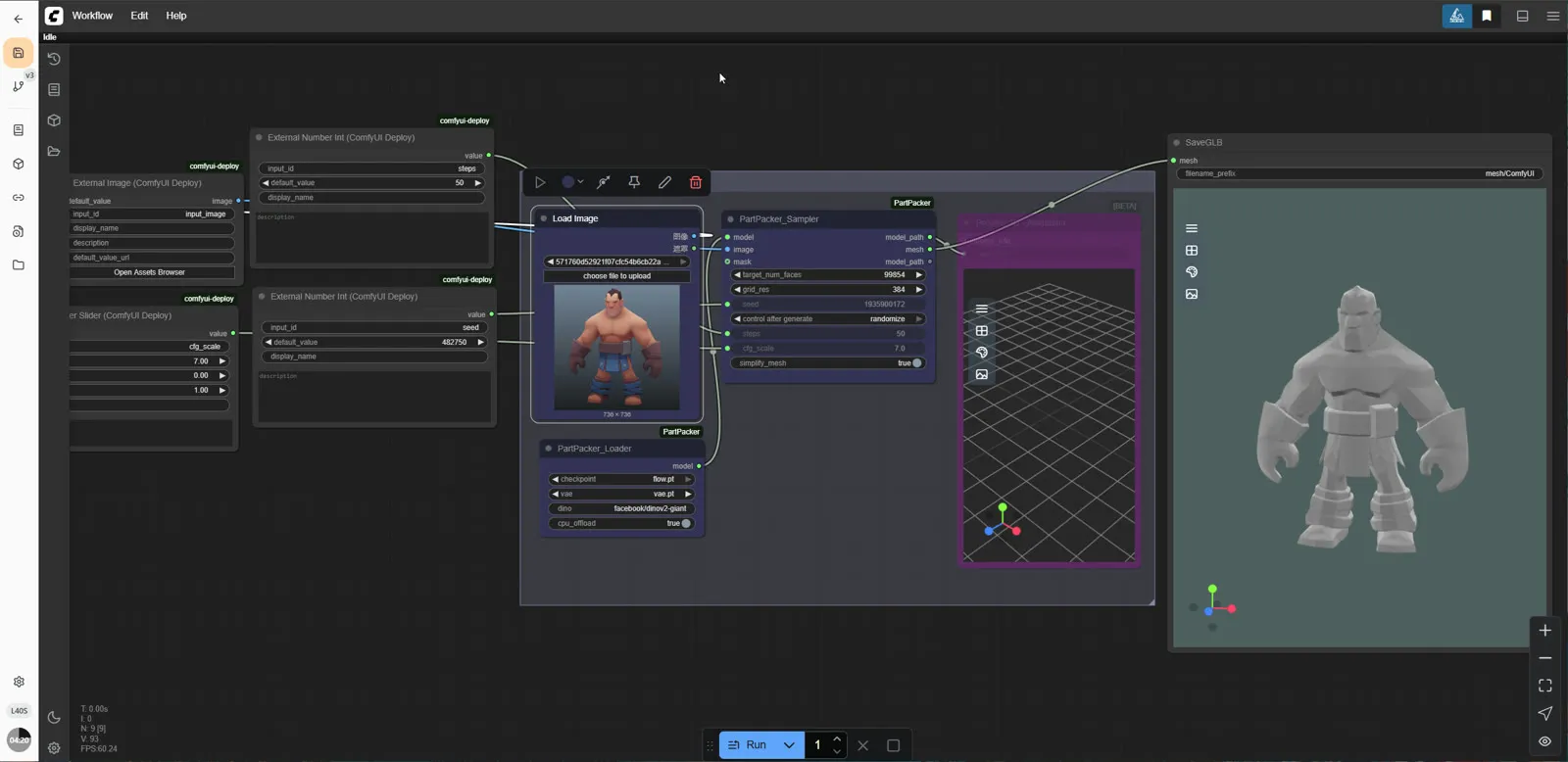
This is one of the smallest 3D workflows you can run. PartPacker_Loader loads the two model files flow.pt and vae.pt. Your image arrives through a ComfyUIDeployExternalImage input and a LoadImage node, and PartPacker_Sampler generates the mesh from it.
The sampler exposes three settings as ComfyDeploy inputs: seed, steps and cfg_scale. The defaults in the workflow are 50 steps and a CFG scale of 7. PartPacker works with parts, so the generated mesh is built from separate pieces rather than one fused surface. The result goes to SaveGLB, which writes the file, and Preview3DAnimation shows the mesh in the interface.
No custom node packages are listed beyond the PartPacker nodes themselves, and no text prompt is needed.
Tips
- Use an image with a single, clear object on a plain background.
- Change the seed to get different mesh variations from the same picture.
- Lower the step count for quicker tests, then raise it for the final mesh.
- Open the GLB in Blender or a web viewer to check and clean the parts.
Run it as an API
Because the image, seed, steps and CFG are ComfyDeploy inputs, you can send an image to the API and get a GLB back, for example from an asset pipeline.
What you can use it for
- Turning concept art into a starting 3D model
- Prototyping props and objects for games
- Quick 3D previews of product ideas
- Producing GLB files for web 3D viewers
Run it in three steps
Open the template
Click Run on ComfyDeploy. The workflow, its custom nodes and models are set up for you on a cloud machine.
Add your inputs
Provide input image and seed in the playground or the ComfyUI editor.
Run, share or deploy
Run it on an L40S, share it with your team as a playground, or deploy it as an API endpoint.
Frequently asked questions
What GPU does PartPacker need?
The recommended GPU is the L40S. ComfyDeploy provisions it for you, so there is nothing to install.
What file format does it output?
It writes a GLB file with the SaveGLB node and shows a preview in Preview3DAnimation.
How do I run PartPacker as an API?
Deploy the workflow on ComfyDeploy and call the generated endpoint. The ComfyUIDeployExternal input and output nodes in the graph become the request and response fields.