
NVIDIA Cosmos 3: Open World Models for Video and Image Generation

Images: NVIDIA Cosmos.
NVIDIA Cosmos 3 is an open family of “world models”: networks that generate video, images, audio and robot actions, and that can also reason about what they see. NVIDIA released it in May 2026, added a 4B edge tier in July, and in October published example checkpoints for interactive driving and robot simulation. Most coverage frames it as a robotics story. For people who build with image and video models, it is also a large, openly licensed video generator with a distilled, few-step variant, which is rare at this scale.
License. NVIDIA’s model cards and repository state that the code and models are released under OpenMDW-1.1, and the Cosmos3-Nano card says the model is “ready for commercial and non-commercial use.” Read the license text before you ship, and note that NVIDIA lists a separate contact for custom licensing.
What is Cosmos 3?
Per NVIDIA’s Cosmos repository, Cosmos 3 is built on a Mixture-of-Transformers design with two parts. A “Reasoner” takes text and vision as input and outputs text, for tasks like grounding and planning. A “Generator” takes text, vision, audio and action inputs and outputs vision, audio and actions. The Cosmos3-Nano model card explains that text is produced by autoregressive decoding, while images, video, audio and actions come from iterative denoising, so one checkpoint covers both.
The base models come in three sizes, according to NVIDIA:
- Cosmos3-Super, 64B parameters. Aimed at the highest quality and at synthetic data generation. NVIDIA lists H200, B200 and GB200 GPUs as the target hardware.
- Cosmos3-Nano, 16B parameters. The balanced tier and the one NVIDIA recommends as a base for post-training. Listed hardware is RTX Pro 6000, H100 and B200.
- Cosmos3-Edge, 4B parameters. For Jetson-class and real-time use.
The Nano card states that only BF16 precision is officially tested, and that the software stack covers PyTorch, Hugging Face Diffusers, vLLM-Omni and SGLang. Static FP8 checkpoints for all three sizes were published later.
What it means for video and image generation
The Nano card lists inputs of text, image and video (with or without audio), with 720p, 480p and 256p resolutions, and video lengths from 5 to 400 frames, 189 by default. Audio comes out muxed into the MP4 as a stereo AAC stream. These are specifications from the model card, not quality claims, and we have not benchmarked the model ourselves.
Two details are useful beyond robotics:
- Distilled variants. NVIDIA’s README lists Cosmos3-Super-Text2Image and Cosmos3-Super-Image2Video, plus 4-step versions of each that it describes as 17 to 25 times faster. Few-step sampling is the main lever for lowering the cost per clip, so these are the checkpoints to watch.
- Synthetic data in the training mix. The Nano card’s dataset section lists 15M synthetic images generated with HiDream-I1 and 14M generated with Qwen-Image-2512, alongside video and captions from other sources. Open image models are increasingly feeding the next generation of video models.

Interactive world simulation and control
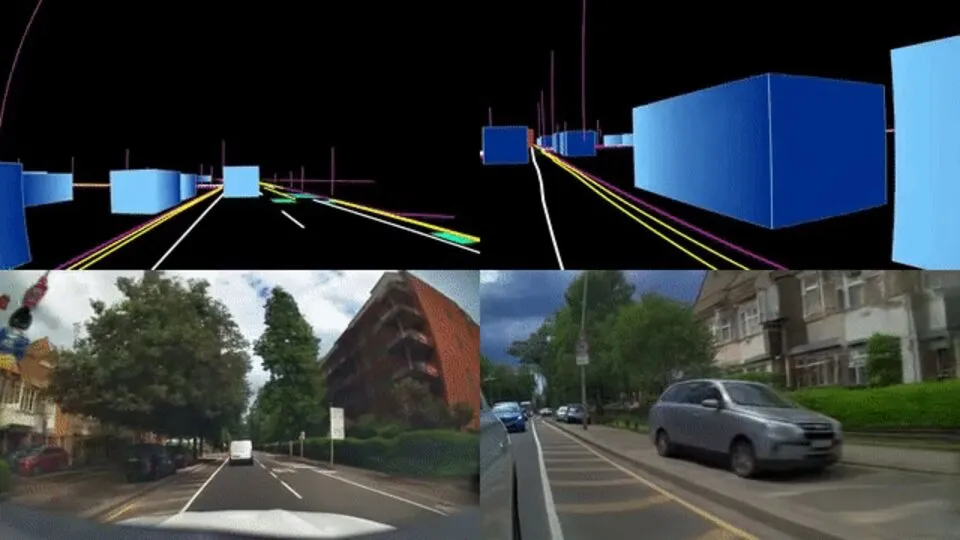
The October update in NVIDIA’s changelog adds post-trained example checkpoints built from Cosmos3-Nano. They include closed-loop driving simulation with multi-view and LiDAR output, multi-view driving data generation with up to 11 views, closed-loop robot policy simulation, and an auto-regressive “transfer” model that conditions on depth, segmentation, edges or blur.
Transfer is the part that will look familiar to ComfyUI users. It is the same idea as ControlNet-style conditioning: a structural input fixes the layout and the model renders the appearance. NVIDIA’s example turns a control layout into photoreal driving footage.
How it compares with what builders use today
If you generate video with Wan, Hunyuan or hosted APIs, Cosmos 3 is a different kind of tool. Its documentation centers on physical plausibility, action conditioning and simulation, not on cinematic or stylistic range. NVIDIA’s own limitations section warns about temporal inconsistency, object morphing and implausible dynamics in long, high-resolution or physically complex outputs. Expect it to suit product demos with believable motion, synthetic training footage and simulation, more than stylized creative work.
On ComfyUI, the source tree we checked includes earlier Cosmos architecture code, but we did not find a Cosmos 3 loader at the time of writing. For now, the supported routes are the Diffusers pipeline (Cosmos3OmniPipeline), vLLM-Omni, SGLang and NVIDIA’s NIM, per the README. NVIDIA also says first-time setup requires accepting access conditions for its Cosmos Guardrail model on Hugging Face.
What this means in practice
- Check the size before planning GPUs. The Nano checkpoint has roughly 15.75B parameters in BF16, which is about 31 GB of weights alone, based on the Hugging Face file metadata. Super at about 64B is roughly 128 GB, so it needs multiple GPUs or an 8-bit build. Treat these as arithmetic from file sizes, not benchmarks.
- Test the 4-step variants first if cost matters, and compare them against your current few-step video models on your own prompts.
- Use the license as an advantage, with care. A commercially usable open license is valuable for video generation, but legal review still applies.
If you want to experiment without owning H100-class hardware, you can run image and video models in the cloud on ComfyDeploy and expose them as an API or share them in the playground. Cosmos 3 itself is not a ComfyUI workflow yet, so browse our Wan video workflows for graphs that run today, or read our earlier posts on FLUX 3 Image Klein and Qwen-Image 2.1 for the open image side.
Sources: NVIDIA Cosmos on GitHub, Cosmos3-Nano model card, Cosmos 3 collection on Hugging Face.