Character Template (Nano Banana)
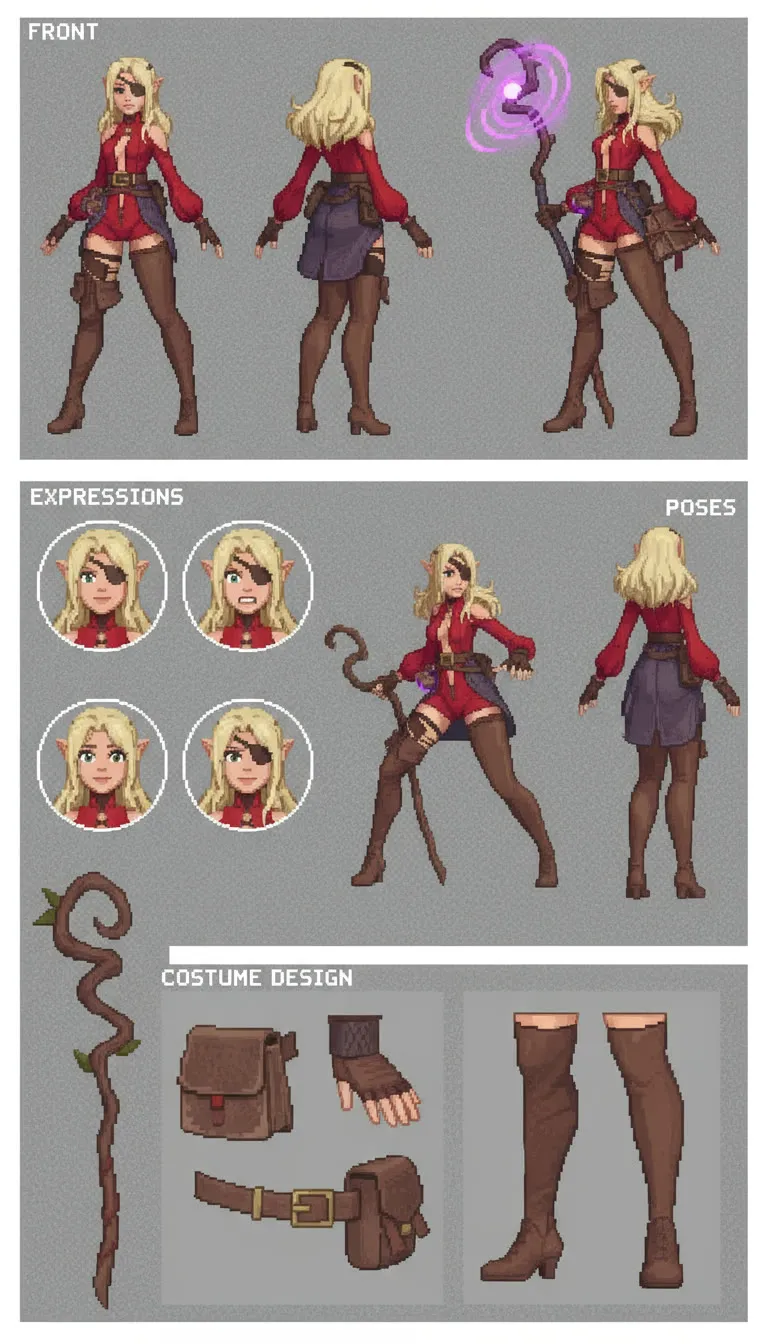
Upload a single character image, describe a style, and get character design variations such as poses, expressions and colorways. Built for concept artists and game or comic creators.
- T4
- Image editing
- Text to image
- Free template
How it works
This is a Nano Banana workflow, meaning the image generation is done by Google’s Gemini 2.5 Flash Image model (google/gemini-2.5-flash-image-preview) through OpenRouter. There are no local checkpoints to load, which is why it fits on a small GPU.
Your subject image goes through a ResizeAndPad node that fits it to the aspect ratio you pick (square, 3:4, 4:3, 9:16 or 16:9). A BananaTaskGenerator node and the LLMPromptManager from the llm-toolkit package combine your style prompt with the task instructions. Then the GenerateImage node sends the padded image and the prompt to the model, using the provider selector and the OpenRouter config node, and the result is saved with SaveImage.
The playground inputs are the subject image, the style prompt, an extra prompt, the aspect ratio, a seed, the model choice and your API key.
Tips
- The image is padded to the chosen ratio, not cropped. Crop your reference first so the character sits well in the frame.
- Keep the style prompt short and concrete, such as an era, medium or game genre.
- Use the extra prompt field when you want a specific edit. It accepts a full instruction if no OpenAI key is set in machine secrets.
- Change the seed to get a different variation of the same prompt.
Run it as an API
Once deployed on ComfyDeploy, the workflow becomes an endpoint you can call from your own app or pipeline.
What you can use it for
- Pose and expression sheets from one character image
- Color variations of a character design
- Restyling a character into a retro game look
- Adding a logo or accessory to a character outfit
Run it in three steps
Open the template
Click Run on ComfyDeploy. The workflow, its custom nodes and models are set up for you on a cloud machine.
Add your inputs
Provide subject (character) image and style or task prompt in the playground or the ComfyUI editor.
Run, share or deploy
Run it on a T4, share it with your team as a playground, or deploy it as an API endpoint.
Frequently asked questions
What GPU does the Character Template workflow need?
The recommended GPU is a T4. The image itself is generated by Gemini 2.5 Flash Image through OpenRouter, so the GPU only handles light resizing and padding.
Do I need my own API key?
Yes. The workflow has an external_api_key text input for your OpenRouter key, which the GenerateImage node uses to call the Gemini model. Without a key, the call cannot be made.
Can I change the art style?
Yes. The user_prompt input takes a style description, and the example uses an RPG 32-bit Sega Saturn era look. The extra prompt field also accepts a full task such as swapping an item between two images.
Related workflows
All Nano Banana workflowsVirtual Try-On with Nano Banana
No GPU needed
Through the Ages Photo Grid (Nano Banana)
No GPU needed